Introduction
Spheronizator is a Python research utility designed to voxelize protein structural data from existing PDB and mol2 files for use in machine learning training sets. The utility is intended to be a part of your data processing pipeline, with an interface that is convenient to use with IPython, Jupyter, or similar.
More specifically, spheronizator implements a methodology for extracting features from the spatial environments surrounding each residue.
The utility is designed such that the number, type, and content of each extracted feature can be easily adapted for a researcher’s needs. The idea is that a researcher uses this utility as a backbone for the computation and organization of the spatial significance of each feature.
Basic Description of Methodology
Spheronizator implements its methodology by representing the region around each residue with a rectangular voxel grid. Atoms within the region of space centered on the residue are mapped to this voxel grid, and features from each atom are used to update data associated with each voxel. An output array of the voxels for each residue in the protein is generated.
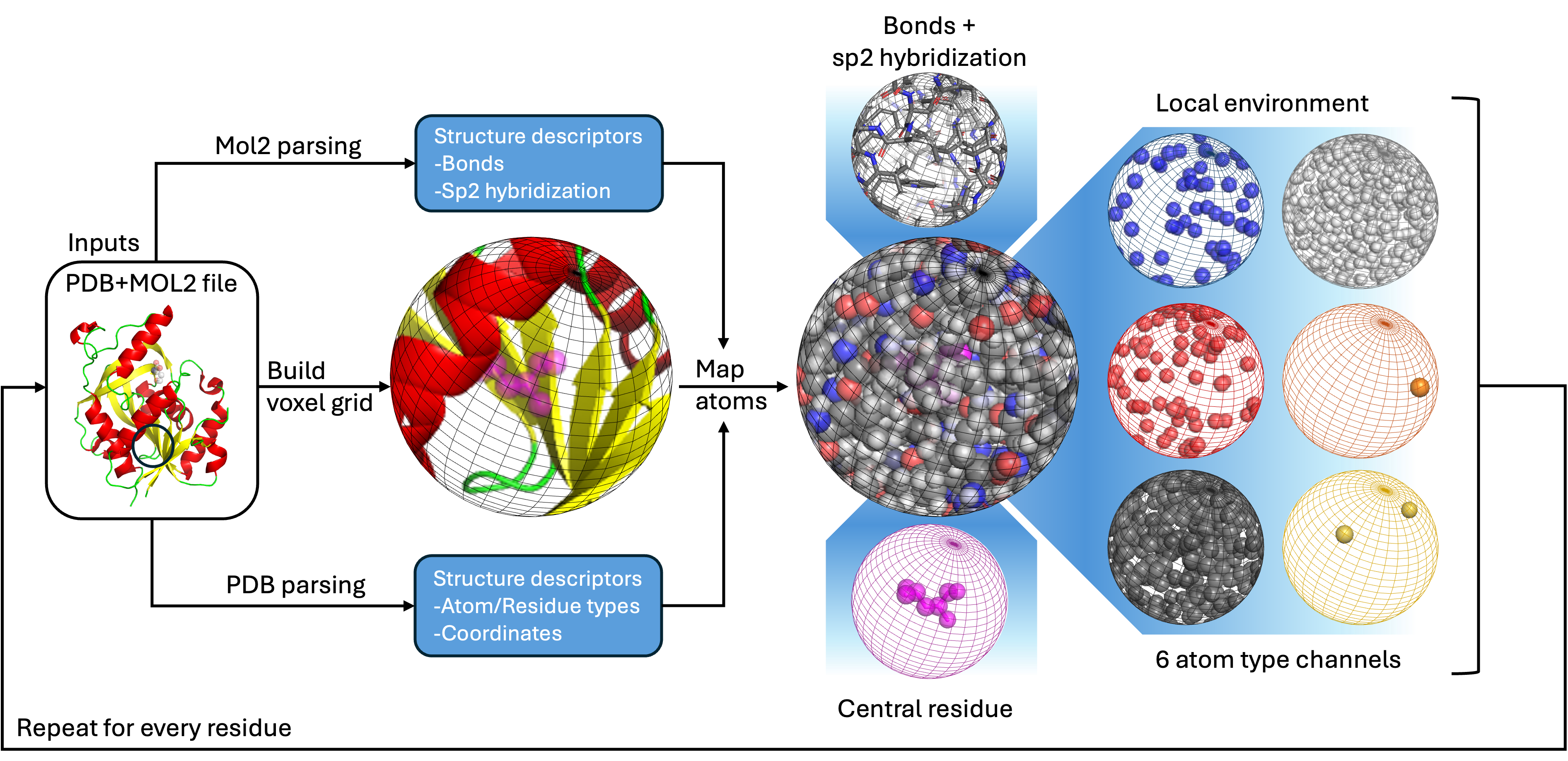
What it does
- Implements a methodology for processing protein data.
More specifically, spheronizator implements the voxelBuilder class which contains functions which:
- Parse protein structural data from provided PDB files and updates the structural data with additional information contained in corresponding mol2 files.
- Process parsed protein data into configurable Numpy output arrays on a per voxel basis to generate a subset of data representative of the local environment around each residue.
What it does not do
- Automate the processing of protein data
- Save output arrays
- Train a model
- Implement a model
Installation
There are a number of ways to go about installing and using this package. A sensible way to use this package is to create a conda environment for it, then install the package to that conda environment with pip. You may also use Poetry to facilitate installing the package to a virtual environment, which I recommend.
Dependencies
Spheronizator has limited dependencies which will be automatically installed by using Pip or Poetry.
| Package | Version | Notes |
|---|---|---|
| Biopython | 1.85 | Development was done on version 1.81, but the package has been tested on 1.85 |
| Numpy | 1.26.4 | Package has not been tested on Numpy 2.0 |
Package Manager
Spheronizator is available in PyPI and can easily be installed with pip.
pip install spheronizator
Using a Conda Environment
If you prefer to install the package into a Conda environment, you can use the configuration from the repository.
First download the configuration:
curl -L -o spheronizator_env.yml https://raw.githubusercontent.com/dias-lab/spheronizator/refs/heads/main/spheronizator_env.yml
Now create a Conda environment using the configuration:
conda env create -f spheronizator_env.yml
conda activate spheronizator
You can now install the package into the environment with pip:
pip install spheronizator
Install Development Version from Source
Spheronizator package management is handled by Poetry, which also provides a convenient way to install the source into a virtual environment.
First install Poetry if you don’t already have it:
pipx install poetry
then clone the repository:
git clone git@github.com:dias-lab/spheronizator.git
then install the package in development mode to a virtual environment:
poetry install
You can build the source and wheels archives with:
poetry build
Getting Started
Using the package should be straightforward as the interface is designed to fit comfortbly into the typical workflow in the field using the IPython interpreter, either standalone or in Jupyter.
A Jupyter notebook with the following example can be found here.
Importing
First import the package:
import spheronizator as sp
This allows you to create instances of the voxelBuilder class, which is the heart of the package.
As an example, create a new voxelBuilder object called x.
x=sp.voxelBuilder()
Configuration
When you call a new instance of the voxelBuilder class, it accepts 1 argument, config, which is the path to an optional configuration file. This file stores the default configuration and one is provided to you in the directory to work with. The argument allows you to specify a different configuration file.
x=sp.voxelBuilder(~/path/to/config/testing.config)
Configuration Attributes
It is not necessary to use the configuration file to change the settings.
Optionally, you can update the settings by changing the object’s attributes on-the-fly. It’s not necessary to change or load different configation files every time.
See the configuration documentation for more details.
As an example, we can update the following three attributes:
x.boxSize=20
x.voxelSpacing=1
x.useFloatVoxels=True
Loading Protein Data
To load protein data, you will need to parse both a PDB and corresponding mol2 file. Parsing of both of these file types is handled separately by the mol2parser class which is provided by the package.
To simplify the interface of this project, a wrapper for the mol2parser class is included as a method for the voxelBuilder class. This method prevents you from needing to interact with the mol2parser class at all; however, the mol2parser class can be used as a standalone parser for other projects if needed.
Using the wrapper
Using the parser method is simple. Simply call the parse method with 1 argument specifying the path to a PDB file:
x.parse('testing_set/1YU6_C.pdb')
By default, the parser looks in the same directory for the corresponding mol2 file. The mol2 file must have the same name, plus the extension .mol2. This way you won’t need to specify both PBD and mol2 files, just the PDB file if they follow this naming scheme.
If needed, a second argument specifies the corresponding mol2 file:
x.parse('testing_set/1YU6_C.pdb', 'testing_set/1YU6_C.pdb.mol2')
Parsing Details
The parser will parse the specified PDB file and from it extract a list of atom objects. The parser then parses the corresponding mol2 file and updates the atom objects with additional data. The residues and atom objects are then all stored as attributes of the voxelBuilder class.
x.structure
x.residues
x.atoms
x.resnames
Atom Objects
Biopython atom objects are the core data type for this project. You can learn more about Biopython atom objects by reading the Biopython documentation. The attributes of each Biopython atom object are updated with data extracted from the associated mol2file. A list of these attributes follows.
atom.bondData
atom.isAA
atom.detailedAtomType
atom.atomType
atom.residueIndex
atom.mol2atomIndex
Building Output Array Data
Building the output array is as simple as invoking the buildData method as follows. This presupposes that the data has already been parsed. This method, in order:
- Generates the voxel array that we will need based on the configuration parameters
boxSizeandvoxelSpacing. The voxels are not unique to each residue, so the same voxel array is used for all residues in the protein. The generated voxel array can be found under the attribute.voxels - Initializes Numpy arrays of zeros for our output data with the appropriate shape. Currently two arrays are created:
- voxelBuilder.output for atom presence / abscence
- voxelBuilder.outputBonds for count of certain types of bonds within each box
- Iterates through each residue computing data for each and updating the output arrays.
Once the output arrays are built, they can then be saved using any external tool of your choice, or immediately processed by the remainder of your data processing toolchain.
Command Line Interface
Spheronizator now includes a command line interface contributed by Dr. Raquel Dias and José Cediel-Becerra.
The command line interface allows generation of static data files from provided PDB files. It requires that Open Babel is installed. You may wish to install Spheronizator into a Conda environment to facilitate the installation of Open Babel.
Usage
The command line interface can be invoked by running the following command:
voxelize -h
usage: voxelize [-h] [--voxel_spacing VOXEL_SPACING] [--use_float_voxels USE_FLOAT_VOXELS] [--box_size BOX_SIZE] [--use_spheres USE_SPHERES]
                [--data_type DATA_TYPE] [--overwrite] [--atom_out_dir ATOM_OUT_DIR] [--bond_out_dir BOND_OUT_DIR] [--meta_out_dir META_OUT_DIR]
                pdb_file

Extract voxel boxes/spheres from a protein PDB file

positional arguments:
  pdb_file              Protein PDB file to process

options:
  -h, --help            show this help message and exit
  --voxel_spacing VOXEL_SPACING
                        Voxel spacing (default: 0.5)
  --use_float_voxels USE_FLOAT_VOXELS
                        Use float voxels (default: True)
  --box_size BOX_SIZE   Box size (default: 20)
  --use_spheres USE_SPHERES
                        Use spheres (default: True)
  --data_type DATA_TYPE
                        Data type (default: float16)
  --overwrite           Overwrite existing outputs if present
  --atom_out_dir ATOM_OUT_DIR
                        Directory for atom voxel outputs (default: ./output_vox_atoms)
  --bond_out_dir BOND_OUT_DIR
                        Directory for bond voxel outputs (default: ./output_vox_bonds)
  --meta_out_dir META_OUT_DIR
                        Directory for metadata outputs (default: ./metadata)
Examples
To run Spheronizator on a protein file:
voxelize tests/sampledata/1YU6_A.pdb
Outputs
The utility produces three main directories:
-
metadata/
Contains a.tsvfile summarizing the metadata for each residue, including:- Box index
- Residue index
- Residue label
-
output_vox_atoms/
Contain a NumPy.npyfile representing the atom-level voxelized features for each residue. -
output_vox_bonds/
Contains a NumPy.npyfile representing the bond-level voxelized features for each residue.
Data Files
Spheronizator requires data files to be able to operate. It requires both:
- A PDB file
- A corresponding mol2 file
PDB Files
PDB files (Protein Data Bank files) are a standard molecular file format. These can be exported from many compatible pieces of software. You will need to provide at least one PDB file to Spheronizator to have data to process.
PDB files can be sourced for free from the Protein Databank, licensed under CC0 1.0 Universal (CC0 1.0) Public Domain Dedication.
Mol2 Files
mol2 files are a less common format but can be generated automatically from existing PDB files with the open source utility Open Babel.
With Open Babel, a PDB file can be converted to mol2 with the following command:
obabel -ipdb protein.pdb -omol2 -0 protein.mol2
Please see the Open Babel Documentation for more information.
The voxelBuilder class
The voxelBuilder class is the primary interface for spheronizator.
Methods
voxelBuilder.reloadConfig(configPath=None)
Parse a configuration file at a provided path, then update attributes.
voxelBuilder.parse(pdbfile, mol2file=None)
Parse protein data from a given PDB file and mol2 file. The mol2 file and PDB file must be for the same protein.
By default, the mol2 file is treated as having the same naming convention as the PDB file. As an example, the command
voxelBuilder.parse(protein_data.pdb)
will look for files with the naming scheme
protein_data.pdb
protein_data.mol2
voxelBuilder.buildData()
Initializes voxel arrays, output arrays, and then builds the output array. Does not take any arguments.
voxelBuilder.check_collision()
Returns True if there has been a collision of two or more atoms located at a specific voxel. Datatype for the output array must not be boolean.
voxelBuilder.find_collision()
Returns the indicies of the output array where two or more atoms have been represented by a single voxel. Dataype must not be boolean.
Attributes
.config
Configuration attribute. See configuration.
.boxSize
Configuration attribute. See configuration.
.voxelSpacing
Configuration attribute. See configuration.
.useFloatVoxels
Configuration attribute. See configuration.
.dataType
Configuration attribute. See configuration.
.useWarnings
Configuration attribute. See configuration.
.useSpheres
Configuration attribute. See configuration.
.bondTypeDict
Dictionary defining the mapping between types of bonds and their locations in the output array.
.atomTypeDict
Dictionary defining the mapping between types of atoms and their locations in the output array.
.structure
Biopython structure object of the parsed protein.
.residues
List of Biopython residue objects located in the structure.
.atoms
List of Biopython atom objects located in the structure.
.resnames
List of all residue names located in the structure.
.voxels
Voxel array which is used to check spatial presence of atoms in the structure. This array should not be changed by hand. It is initialized automatically based on the configuration settings when building the output array.
.output
Output numpy array consisting of the final processed data.
.outputBonds
Bond information array, part of the final processed data.
Configuration
It is not necessary to use a configuration file to adjust the parameters of the utility. It is possible to update all configuration parameters by adjusting the values of the corresponding attributes after initializing a new instance of the voxelBuilder class.
The configuration file simply selects the starting values these attributes will be initialized with when creating a new instance of the voxelBuilder class.
The configuration file supports the following parameters.
| Parameter | Type | Description |
|---|---|---|
| boxSize | float | The dimensions of the output array. If boxes are used, this will be the length of one of the edges. If spheres are used, this will be the diameter of the sphere. Keep in mind since the origin is included, a boxSize of 20 with 1 angstrom spacing will produce a 20 angstrom box with an array size of 21x21x21. |
| voxelSpacing | float | Distance between each of the voxels in angstroms. |
| useFloatVoxels | bool | Whether or not to generate the output array with the float data type or not. Must be on to use non-integer spacing of voxels. |
| dataType | string | Data type of the Numpy output array. Boolean is recommended to reduce the size of the output array, but if you’d like to handle collisions or debug them, must be set to integer or float. Can be any Numpy data type |
| useWarnings | bool | Whether or not to display warnings when generating output arrays. |
| useSpheres | bool | Whether or not to use spheres when rendering the output array. If false, boxes will be used instead. |
Contributors and Acknowledgments
| Name | Affiliation | Description |
|---|---|---|
| Matthew Richardson | University of Florida | Primary developer, design, documentation, package maintenence |
| Dr. Raquel Dias | University of Florida | Design, mentor, testing, suggestions, advice |
| Dr. Jose Cleydson Ferreira Silva | University of Florida | Mentor, testing |
| José Cediel-Becerra | University of Florida | Contribution of command line interface |
Research Associated with Spheronizator
Spheroniztor has become associated with a number of on-going research projects, some of which are listed below.
- Dias, Raquel and Ferreira da Silva, Jose and Larkin III, Joseph and Price, Ayana and Richardson, Matthew. System and Method for Predicting JAK Mutations and Their Impact on Drug Efficacy. United States Patent 049648/629493. Application Number: 63/806,088. Filed: May 15th, 2025.
Project Links
Github
https://github.com/dias-lab/spheronizator/